How can we help?
On Premise Application Structure
Overview
Note: This information applies to the On Premise implementation. For more information about Cloud application structure, click here.
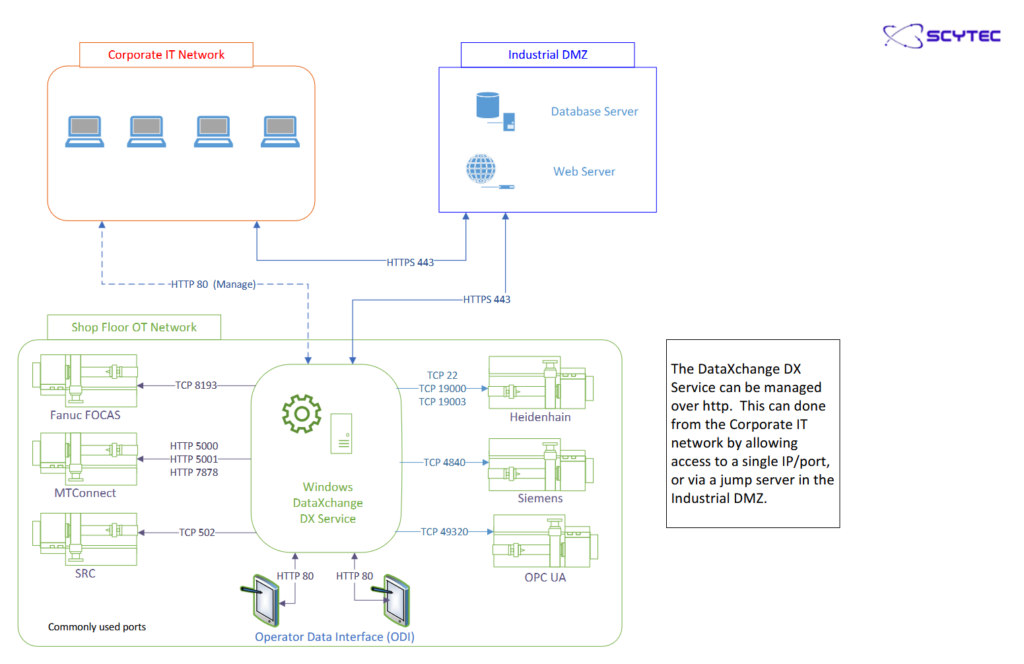
An On Premise implementation of DataXchange requires additional back end infrastructure in order to operate. This includes a Microsoft SQL Server and an IIS Web Server. All communications from the DataXchange components routed through the web server, direct database access is only needed from the web server to the SQL server.
In addition to the back end requirements, DataXchange has four primary components, a Windows Service, the Data Display Web Application, the Operator Data Interface (ODI), and the DataXchange Windows Application, a desktop application. The DataXchange Windows Service, or DX Service, does all of the work of communicating to the equipment and uploading the recorded data. The service is designed to be on one or multiple computers within the facility where the equipment is located.
Data Display is the primary interface for viewing data recorded by the DataXchange Service. It is used to view live dashboards and historical charts and reports. Data filters can be saved to be run at any time as well as emailed on a scheduled basis. This web-based application can be accessed either in a web browser or via downloadable apps available for iOS and Android.
The ODI is an Android, iOS, or Windows Store application used by operators to input downtimes and other information about the machine status that cannot always be obtained from the machines automatically. The ODI communicates directly with the DX Service.
The desktop application, called the DataXchange Windows Application, is used for some aspects of configuration including setup of the information needed to collect data. For example, defining data collection rules, assigning rules to machines, and other configuration settings. The Client is installed by a per Windows user basis.
Another task the Client performs is to configure and manually control the DataXchange Windows service. For this task the Client must be installed on a computer that can access the computer with the Windows service installed via a local network.
The default communication protocol between the Client and the Service as well as the ODI and the Service is HTTP over TCP port 80. You may need to configure your firewall to allow this connection.