How can we help?
Heidenhain Secure Connection
Overview
DataXchange has the ability to create secure connections to Heidenhain TNC 7 controls. Newer machines may require this in order to connect at all. The steps to configure this are detailed below.
Machine Setup
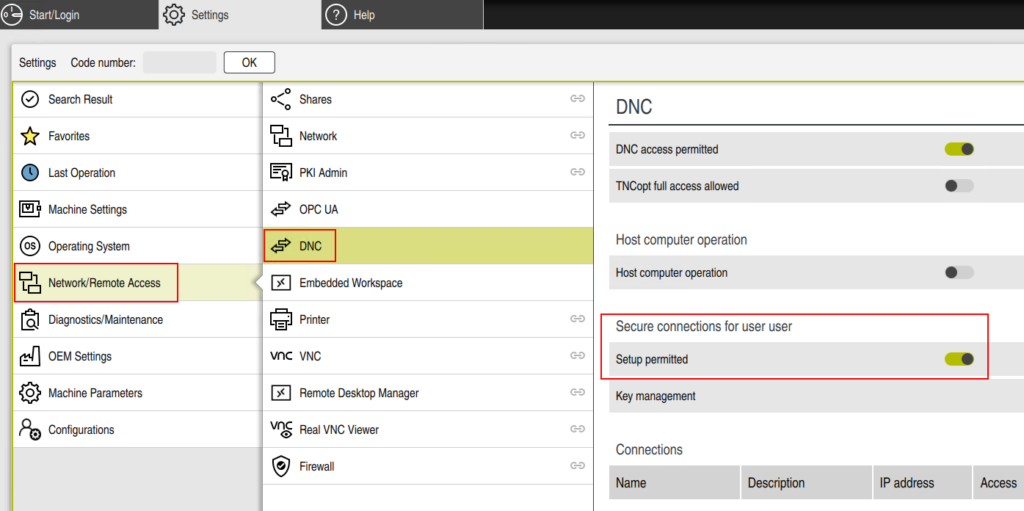
On the Heidenhain control, go to Settings → Network/Remote Access → DNC. Under the Secure connections for user user section enable the Setup permitted option.
DataXchange Setup
The secure connection option can be added to a new connection or an existing connection. In either case, follow these steps:
- Log into the DataXchange Windows Application
- Go to the DataXchange tab.
- Select the machine on the left side.
- Click Communication.
- If the Heidenhain source has not been created yet, click Add. If the source already exists, click the Source and click Modify.
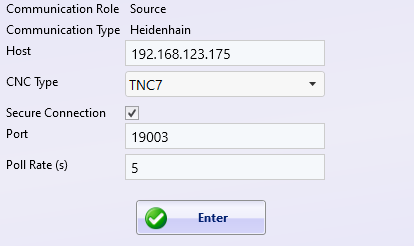
- Check the “Secure Connection” checkbox. If this is a new Communication Source, enter the IP address of the machine and be sure to select TNC 7.